


Monday, January 23, 2012


Latest Technology
Aerostat Radar

India has recently acquired Aerostat radars. The entire system is divided in major parts. Firstly, the aerostat balloon which has been acquired from Israel and second part is the payload on board the balloon which consists, advanced programmable radar (APR), Electronic Intelligence (ELINT), Communication Intelligence (COMINT) and V/UHF radio telephony equipment and Identification Friend or Foe (IFF). It has the capability to be integrated with AWACS and ground air defence environment and funtion as a command and control centre. Depending upon the payload the theethered balloon can be raised to the height between 10000 feet to 16000 feet.
The system gives a seamless radar cover of 300 km plus at low level along with good RT range and requisite ELINT. The system could be termed as static AWACS. Off course it comes with some vulnerabilities and limitations, like weather, wind speeds, lightning & thunder, launch & recovery periods are vulnerabilities. Its virtues also make it a prime target for enemy therfore it needs to be protected by exclusive air defence weapons. But we hope that the advantages of such system would outlast the limitations
The system gives a seamless radar cover of 300 km plus at low level along with good RT range and requisite ELINT. The system could be termed as static AWACS. Off course it comes with some vulnerabilities and limitations, like weather, wind speeds, lightning & thunder, launch & recovery periods are vulnerabilities. Its virtues also make it a prime target for enemy therfore it needs to be protected by exclusive air defence weapons. But we hope that the advantages of such system would outlast the limitations
Nuclear Power Plants of USA:

ROBORT TECHNOLOGY
Robort technology can help in human problems like damage to nuclear power in japan.

LINKS: http://technicallyphilly.com/tag/robotics
Also this technology help in earthquake and tsunami.japan government sent to monitor
With cameras to sea level of water.Robort working with humans in the world.
This robort technology first intro a labor,now this technology spread all universities and more and more devolopement in this field.
First industrial Robort can make in 1961 GM factory and then in 1980 its make a globle market in japan.
Korea also devlopment in this field and make robortic vacume cleaner.
ASIMOS ROBORT
This ASIMOS Robort technology is new artificial intelligence.This Robort is desgin as human ,and also
Work like a human being ,this robort run 6 km/h like a sport man.This robot work all type which can perform a man.Asimos think like a human for example he feel all things which think a man ,for siting table he feel tuch them and then sit it.In this robort a software will design which can perform all activties like a human.
LINKS: http://technicallyphilly.com/tag/robotics
 |
and get more information through this site.

Thursday, January 19, 2012
USB Port Locked 2.0 Free

USB Port Locked 2.0 New Features :
- NEW! System Tray Icon. Now USB Port Locked already be hiding in the
- Tray Icon
- NEW! Tools viewing process. You can use this tool to see what processes
- are running on your Windows
- REPAIR! Improved locking USB port. Now you can lock the USB port is for
- sure locked.
- Lock the USB port quickly and all USB ports are locked in a flash
- Very mild, with a size of 200 KB (compressed) or 1.2 MB (extracted)
- Portable. You do not need to install this application if you want to use it on another computer
- Easy to use. Very easy to use this application without requiring
- any expertise
- Free. Smoking in use by anyone, anytime. you can free download USB Port Locked 2.0 now.
Monday, January 16, 2012
Computer
From Wikipedia, the free encyclopedia
For other uses, see Computer (disambiguation).
"Computer technology" redirects here. For the company, see Computer Technology Limited.

     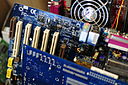  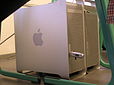 |
Conventionally a computer consists of some form of memory, at least one element that carries out arithmetic and logic operations, and a sequencing and control unit that can change the order of operations based on the information that is stored. Peripheral devices allow information to be entered from an external source, and allow the results of operations to be sent out.
A computer's processing unit executes series of instructions that make it read, manipulate and then store data. Conditional instructions change the sequence of instructions as a function of the current state of the machine or its environment.
The first electronic digital computers were developed in the mid-20th century (1940–1945). Originally, they were the size of a large room, consuming as much power as several hundred modern personal computers (PCs).[1] In this era mechanical analog computers were used for military applications.
Modern computers based on integrated circuits are millions to billions of times more capable than the early machines, and occupy a fraction of the space.[2] Simple computers are small enough to fit into mobile devices, and mobile computers can be powered by small batteries. Personal computers in their various forms are icons of the Information Age and are what most people think of as "computers". However, the embedded computers found in many devices from mp3 players to fighter aircraft and from toys to industrial robots are the most numerous.

The Blogger Template Designer
Today we’re taking a big first step in improving not just our template designs, but all the ways that you can customize the look and layout of your blog. We even made a video with jaunty music to show it off:
Here’s what we’re launching today to Blogger in Draft:
 15 new, highly-customizable templates from our design team, split into four families: Simple, Picture Window, Awesome Inc, and Watermark
 One-, two-, and three-column layouts for each template, with complete control over the size and arrangement of the columns
 Hundreds of background images and patterns from iStockphoto, the leading microstock image marketplace
Try it Now
Go to http://draft.blogger.com/ to log in to Blogger in Draft. (If you’ve never been there before, Blogger in Draft is just like regular Blogger, except with new, in-development features like this one.) Click on your blog’s “Layout” link to go to the Layout tab. The link to the Template Designer is at the end of the row of sub-tabs.

 You can use the live preview to see your new template without affecting your blog. When you find a new look that you’re happy with, just click the “Apply to Blog” button to publish it to the world. Note: You can backup your existing template ahead of time by going to Layout > Edit HTML. We recommend this if you have a customized blog design that you might want to go back to.
Classic template blogs: If you have a “Template” link or tab instead of “Layout,” you’ll first need to switch from Classic to Layouts before you can try out the Template Designer. Go to Classic > Customize Design and follow the instructions there. You’ll need to switch to one of our old templates first, but then you’ll be able to use the Template Designer to pick a new one.
Tips from the Blogger Team
 Get your links to match a background image quickly by using the Background panel’s “Main color theme” to adjust all of your blog’s colors at once. This works particularly well with Simple’s second design.
 With a three-column footer, you can fit in several gadgets to interest your readers after they’re done reading your post. For inspiration, read Derek Powazek’s post, “Embrace your bottom!”
 If you’re using our new Pages feature, put the Page List gadget in the wide section at the top of your blog. We’ve added unique tab designs to all of the new templates.
 Many of the patterns in the background image picker are semi-transparent, to let your blog’s background color show through. Look for the “transparency page curl” to see which patterns these are.
 The Attribution gadget (added to the footer by all new templates) is there to give credit not just to the designer and artist of the background image, but to you as well. Edit its settings by clicking “Edit” on Layout > Page Elements to add your own authorship or copyright information.
Get Involved
- Show off your new design on Twitter by tweeting your blog’s URL with the hashtag #newbloggertemplate. We’ll be looking for creative designs to feature in upcoming blog posts or as Blogs of Note.
- We’re taking feature requests. Let us know what else you’d like to see with our Google Moderator page. (And don’t worry: uploading your own background image is already filed and at the top of our list!)
- To report bugs or discuss the Template Designer in more detail, start a thread on our discussion forum. Include “Template Designer” in the subject so we’ll be sure to see it.
- Do you design templates for Blogger? Join our template designer group for documentation and discussion on working with the new templates, as well as details on how to get your designs into the Template Designer.
Miscellaneous Notes
- The Template Designer is not supported on Internet Explorer 6, nor, for that matter, are the new templates. While we’ve made an effort to ensure that they’ll still be readable, the new designs are not going to look particularly attractive on IE6. We strongly encourage the very small number of bloggers and readers still using IE6 to upgrade to a more modern browser. For more information about browsers, visit Google’s What Browser? site.
- The rounded corners and drop shadows used in several of the templates may not be visible in older versions of some browsers. Opera users will need to wait for Opera 10.5, currently in public pre-alpha release. IE7 and 8 users will not see these effects within the Template Designer, but will see most of them on the live blog itself.
- From within the Template Designer you can only move gadgets around, you can’t add, delete, or change their settings. Those features are still on the Layout > Page Elements page.
- Some gadgets, such as Poll, Reactions, or third-party Google Gadgets will not reflect color changes in the live preview but will after the template is applied. Others, such as Followers and AdSense, will not change colors automatically at all. It may be easiest to remove and re-add these gadgets to refresh their palettes, though you could also tweak the colors by hand by editing their settings.
- Customizations to widget templates will be cleared when applying a new template to preserve the new layout. If you have made changes to your widget templates, save them first by going to Layout > Edit HTML and clicking “Download Full Template.” You’ll be able to copy them back in as needed after you apply your new template.


 Multan Time


